Posts

Blogger App using Angular 6 with CLI

Image
Blogger App using Angular 6 with CLI Blogger App developed using Angular 6 version and used below anugular concepts used Full Code :  https://github.com/Brahmaiah-Rayalla/Angular-Blogger Angular Components Angular Services Angular Pipes Bootstrap styles Angular Models # Screen prints: Home:  Posts:  Post:  ContactUS:  AddPost:  This project was generated with  Angular CLI  version 1.7.4. Development server Run  ng serve  for a dev server. Navigate to  http://localhost:4200/ . The app will automatically reload if you change any of the source files. Code scaffolding Run  ng generate component component-name  to generate a new component. You can also use  ng generate directive|pipe|service|class|guard|interface|enum|module . Build Run  ng build  to build the project. The build artifacts will be stored in the  dist/  directory. Use the  -prod  flag for ...

Daily Work Tracker Application Using SprinBoot with Bootstrap

Image
Work Tracker App I have worked on Spring boot and spring data recently. The combo of these two will help us to implement applications very fast and easy.  Work tracker App Built-in using Spring thymeleaf with BootStrap styles and all the spring Components.  A daily Work Tracker --> can submit daily work and Dash board will display all the statistics of the logged-in user. For Full code :  https://github.com/Brahmaiah-Rayalla/WorkTrackerApp Technologies Used Technical Stack Spring Thymeleaf (front-end) Bootstrap styles CSS and Layouts Spring MVC Spring IOC Spring Security Spring JPA Data Spring Boot Tomcat (container embedded with Boot) Application Functionality Functions User Registration with Login User Edit List of Users Dsiplay with all the bootstrap styles Group users Upload Profile Picture Submit Daily Work Track Daily work using Dashboard Dashboard Dashboard statistics No. of work submission No. of Tasks Handled No. of Hours...

Performance Test Applications using JMeter

Image
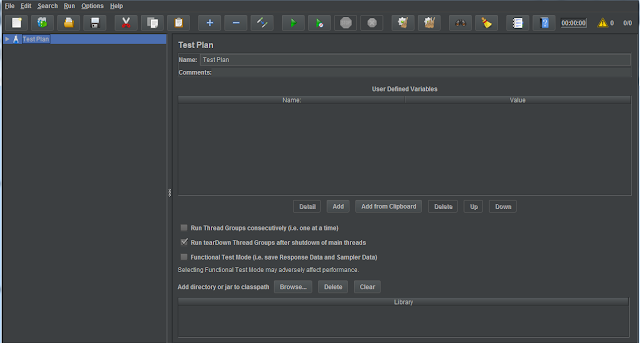
In this post you will see how to load test your App JMeter 1. Download JMeter from  http://jmeter.apache.org/download_jmeter.cgi 2. Go to /bin folder and run Apache JMeter executable jar. 3. Create a TestPlan Create a ThreadGroup from Add--:> Threads and configure below properties no. of threads( users) Ramp-up period in secs (each thread will start after these many secs) Loop Count: specify the how many times it has to run the scenario. If you check forever , it will run forever. Add RecordingController to ThreadGroup from Add--> LogiCcontroller Add HTTPCookieManager to ThreadGroup from Add-->ConfigElement Add HTTPRequestDefaults to ThreadGroup from Add-->ConfigElemen and configure below properties protocol -- HTTP or HTTPS ServerName or IP  Port Add ViewResultsTree to view scenario results from Add--> Listener  Add HTTPTestScriptRecorder to TestPlan from Add--> NonTest-Element Add ViewResultsTree (...

Monolithic vs Micro Services

Monolithic : Developing and maintaining   the whole application into a Single unit. Micro Services : Developing and maintaining individual services and   deploying as single application using light weight protocols for communication. Feature Monolithic Micro Services Language Constraint We have to write entire application in a single language. Micro services can be developed using multiple languages. We can go with multiple persistent databases and frameworks which is best suitable for a business need.   Digestion It is not possible one developer to digest all the modules in the entire application. Micro services are pieces of application. So, digestion is not a problem. Developer can easily concentrate on the assigned service only. Deployment Deployment is easy but we have to deploy the entire application for a small change. Micro serv...

Python and DJango Installation

Image
 Python and DJango Installation Steps Download Python latest version which is compatible to your OS. And then follow below commands through Windows Powershell > pip install virtualenvwrapper-win   -- To install virtual environment > mkvirtualenv myproject   -- create Project you virtual Environment > workon myproject   -- to shift and work on your project > pip install django  -- Install Django using pip > python -m django --version  -- to check installed Django version To create your project                               PS >  django-admin startproject myfirst To run python server                               PS >  python manage.py runserver To apply those changes to the database.     ...

AngularJS Flow

AngularJS  is a very powerful JavaScript Framework. It is used in Single Page Application (SPA) projects. It extends HTML DOM with additional attributes and makes it more responsive to user actions. AngularJS is open source, completely free, and used by thousands of developers around the world. It is licensed under the Apache license version 2.0. AngularJS flow with a simple example <!doctype html> <html> <head> <script src = "https://ajax.googleapis.com/ajax/libs/angularjs/1.5.2/angular.min.js" ></script> </head> <body ng-app = "myapp" > <div ng-controller = "HelloController" > <h2> Welcome {{helloTo.title}} to the world of Tutorialspoint! </h2> </div> <script> angular . module ( "myapp" , []) . controller ( "HelloController" , function ( $scope...

How to get the tweets using Kafka producer and Consume it using MongoDB

Kafka_Mongo_Integration Sample POC on Kafka which will pull tweets from twitter and persist in to the MongoDB Technologies: Kafka Zookeeper MongoDB For full code  https://github.com/BrahmaR/KafkaMongoIntegration Kafka Producer: package com.royal.twitter.kafka; import java.util.Properties; import java.util.concurrent.BlockingQueue; import java.util.concurrent.LinkedBlockingQueue; import kafka.javaapi.producer.Producer; import kafka.producer.KeyedMessage; import kafka.producer.ProducerConfig; import org.slf4j.Logger; import org.slf4j.LoggerFactory; import com.google.common.collect.Lists; import com.twitter.hbc.ClientBuilder; import com.twitter.hbc.core.Constants; import com.twitter.hbc.core.endpoint.StatusesFilterEndpoint; import com.twitter.hbc.core.processor.StringDelimitedProcessor; import com.twitter.hbc.httpclient.BasicClient; import com.twitter.hbc.httpclient.auth.Authentication; import com.twitter.hbc.httpcl...